
New website SEO · 25 practical checks
SEO Checklist for New Websites: What to Fix Before You Try to Rank
Launch with a site that is crawlable, understandable and measurable. Then turn the findings into a prioritized work queue with ActionSEO.
You do not need every SEO task finished on launch day. You need the foundations connected: important pages that work, a clear structure, useful content and a way to measure the next improvements.
Built for new site owners, freelancers and small teams. No checklist can guarantee indexing or rankings.
Already have an established website? Use our general SEO checklist to review your ongoing content, technical SEO and measurement.
A launch sequence you can actually use
A sitemap, an analytics tag and a few optimized titles will not help much if nobody checks how they work together. Use this checklist to find the gaps before scaling content, then keep a record of what you fixed.
Before you ask for traffic
Remove access blockers, connect core pages and verify the important visitor journeys. Make sure the site explains its offer and who is behind it.
After you publish
Inspect key pages, save an audit baseline and watch the early data. Choose improvements based on the evidence your site produces.
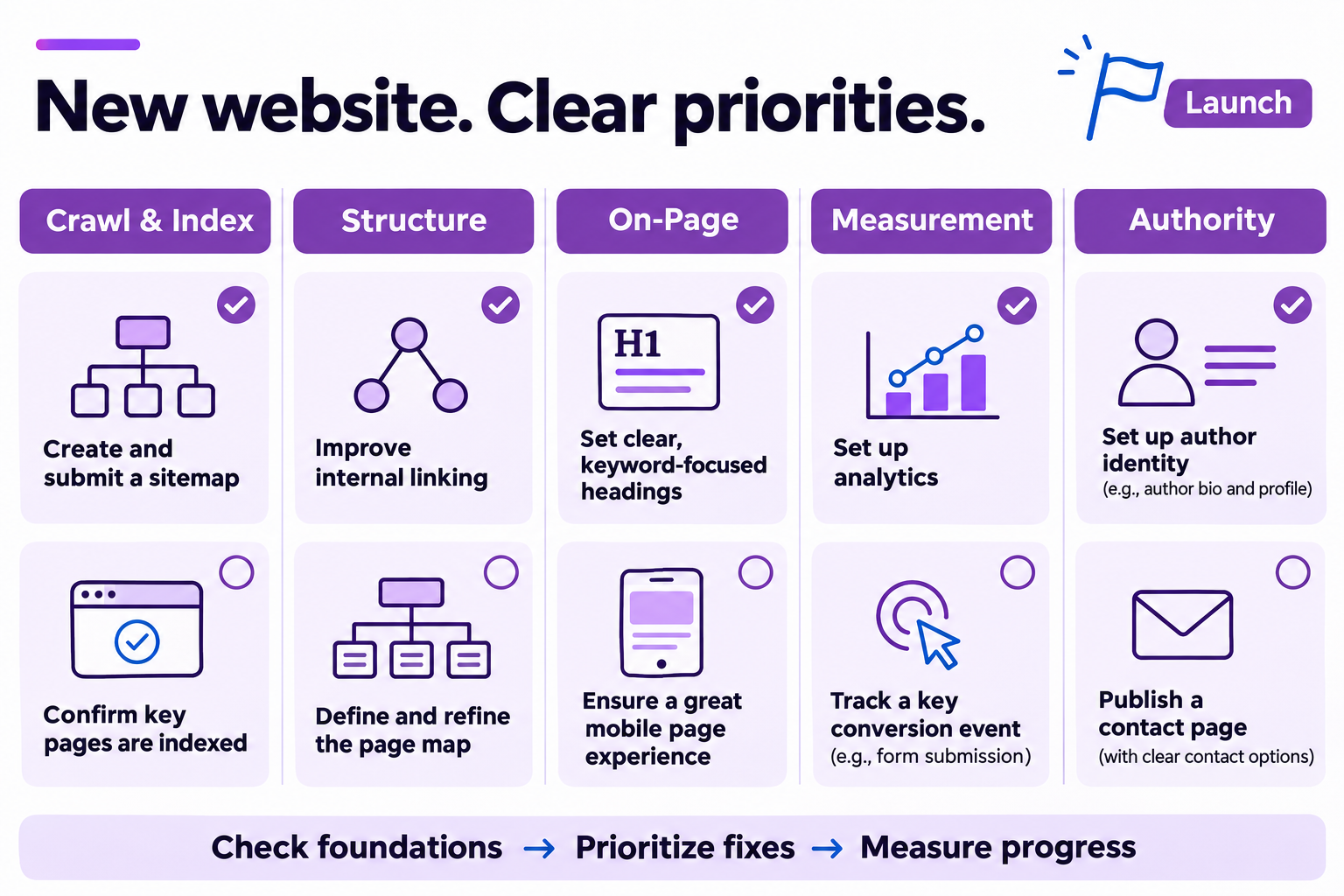
What deserves attention first?
Use business impact and page importance to set the order. A warning on an unimportant page should not displace a broken service page or an indexing blocker.
| Prioridade | Exemplos | Próxima ação |
|---|---|---|
| Launch blockers | Accidental noindex, failed core URLs, broken checkout or inquiry forms | Investigate and resolve before scaling promotion |
| Foundation gaps | Unclear page intent, missing internal links, untested measurement | Assign an owner and fix in the first implementation cycle |
| Ongoing improvements | Additional content, richer examples, incremental presentation changes | Prioritize using evidence after the basics work |
Crawl & index: remove launch blockers first
Before adding more content, make sure your important production URLs can be reached and assessed. A live page, a crawlable page and an indexed page are different things.
- Remove accidental noindex directives Review production meta robots and X-Robots-Tag directives left over from staging. Allow indexing only for the pages intended for search.
- Review robots.txt Check for accidental blocks affecting important content or rendering resources. Robots.txt controls crawling; it is not a reliable way to remove a URL from search.
- Check core URLs and redirects Confirm important pages return the intended status, HTTPS works and links resolve to the preferred version without unnecessary redirect chains.
- Review canonical signals Use consistent internal links and canonicals for the preferred URLs. Check template output rather than assuming the CMS configuration is correct.
- Submit a sitemap and inspect sample pages Verify Search Console ownership, submit an XML sitemap of preferred indexable URLs and inspect the homepage plus key commercial pages. Submission does not guarantee indexing.
Structure: give every important page a clear job
A small site is the best time to build a useful page map. Decide which pages explain, sell and support one another before publishing a large library.
- Map topics to distinct page purposes For each core page, record the audience, search intent, main topic and next action. Consolidate unnecessary overlap before it becomes harder to manage.
- Make navigation useful Give visitors a clear route from the homepage to the main service, product or category pages. Use labels people can understand.
- Connect the first content cluster Choose a hub and connect relevant supporting pages with descriptive links. Add links where they help the reader continue, without forcing a link quota.
- Review titles and the main heading Write a descriptive title and a clear H1 for each core page. Keep headings organized around the page purpose instead of repeating keyword variations.
- Explain the next step Make the opening confirm what the page offers and make the CTA specific. Test the path from the landing page to the form, checkout or contact method.
On-page & experience: make the content easy to use
A technically accessible page still needs a useful answer. Review the actual experience on a phone and make each commercial page understandable without extra explanation.
- Answer the core questions Cover what the visitor needs to decide: who the offer is for, what it includes, practical limitations and the next step. Remove filler that gets in the way.
- Write image alternatives thoughtfully Use descriptive alt text for meaningful images and empty alt attributes for purely decorative images. Describe the purpose without stuffing keywords.
- Test mobile layout and performance Check readable text, navigation, forms and tap targets. Use PageSpeed Insights to investigate loading or interaction issues; treat a lab score as diagnostic evidence.
- Fix broken links and failed assets Review key journeys for broken internal links, missing images and failed resources. Fix important problems before minor cosmetic warnings.
- Check structured data already present Inspect theme and plugin output before adding markup. Use types that accurately describe visible content and validate them; markup does not guarantee a rich result.
Measurement: set up a baseline before traffic grows
Install measurement early enough to understand the launch. Search Console describes Google Search activity; GA4 describes measured site behavior after visitors arrive.
- Confirm GA4 receives expected events Test a real visit and the key page journeys. Review property settings and your consent implementation so you understand what the data covers.
- Define a meaningful business event Choose an outcome such as a qualified inquiry, purchase or completed signup. Configure and test it, and mark the appropriate event as a key event.
- Identify internal and test traffic Configure filters carefully, test their effect and keep a record of exclusions. Do not remove data blindly from a new property.
- Record the launch and audit baseline Save the launch date, initial audit findings and relevant releases. A new site may not have enough data for useful trend comparisons yet.
- Schedule a 30-day review Review discovery, search impressions, clicks, landing pages and measured outcomes. Use the first month to identify the next questions rather than promise a ranking deadline.
Authority & follow-through: make the site credible and maintainable
Trust starts with clear information and useful evidence. Give people a reason to believe the page, then make sure the findings lead to real work.
- Identify the business and relevant authors Show who is responsible for the site and provide useful author context where readers would expect it. Keep contact details easy to find.
- Publish clear commercial and policy information Explain pricing or how to request it, and provide the policies appropriate to the site. Check that these pages are accessible from key journeys.
- Support important claims with evidence Use relevant examples, original screenshots, experience or authoritative sources. Build visibility through useful work and relevant relationships rather than purchased ranking promises.
- Run an audit and prioritize the findings Review page evidence and business impact. Start with blockers and broken important journeys, then work through titles, links, content gaps and conversion paths.
- Assign the next action and verify it Give each important issue an owner and review date. Recheck the affected page after a fix, then use search and analytics data to monitor what follows.
From checklist to an ongoing SEO workflow
The checklist tells you what to examine. ActionSEO helps you review page-level audit findings, turn priorities into Missions and keep progress visible across your projects.
- Audit your site
- Review page evidence
- Prioritize Missions
- Implement & verify
- Measure & report
Use ActionSEO to organize the site work. Check plans and trials for project capacity, crawl limits and Google data access before choosing.
Prefer a daily roadmap?
Comece pelo relatório de free 14-Day SEO Action Plan. For a deeper implementation sequence, explore the premium Full 30-Day SEO Action Plan. The eBook SEO in Action explains the method behind the work.
Your first review after launch
Look for the next useful question, not a perfect score. Which important URLs are discoverable? Which queries are starting to appear? Are people reaching the pages that explain your offer, and can you measure a meaningful outcome?
If impressions rise without clicks, review query relevance and the page’s search presentation. If traffic arrives without useful actions, inspect the intent, offer and conversion path. On a new site, low data volume may mean you need more observation before drawing a conclusion.
New website SEO questions
Should I complete all 25 steps before publishing?
Prioritize access, core journeys, essential page structure and basic measurement before scaling. Some checks, including search discovery and post-launch review, happen after publication.
Does submitting a sitemap guarantee indexing?
No. A sitemap helps discovery, but Google still decides whether to crawl and index a page. Use URL Inspection and review the content and technical signals together.
How soon should a new site rank?
There is no fixed deadline. Discovery, competition, content, technical foundations and other factors affect progress. A 30-day review is a checkpoint, not a promise.
Can ActionSEO replace Search Console and GA4?
Those Google properties remain the sources of your search and site measurement data. ActionSEO adds audit evidence, priorities and project context around the data you connect.
Official guidance for the checks
Use these primary sources when implementing the technical and measurement checks.
Ready to turn the checklist into work?
Review your site with ActionSEO, examine the evidence and build the next actions around what your pages need.
Start with the foundations. Recheck what you change. Keep improving.